Lab 1: Artemis + Bluetooth
Lab 1a
In lab 1a, I got to review Arduino and conducted some fucntions on Redboard Artemis Nano, such as temperature measurement, microphone. Baud rate measures communication speed, basically determining how fast the measurement can be reflected on the channel.
Blink
Watch the videoSerial
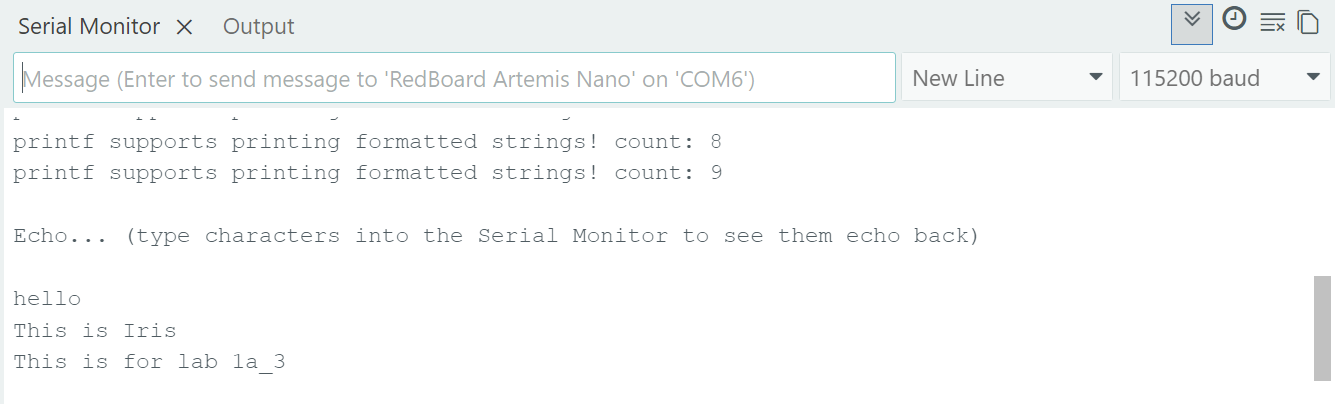
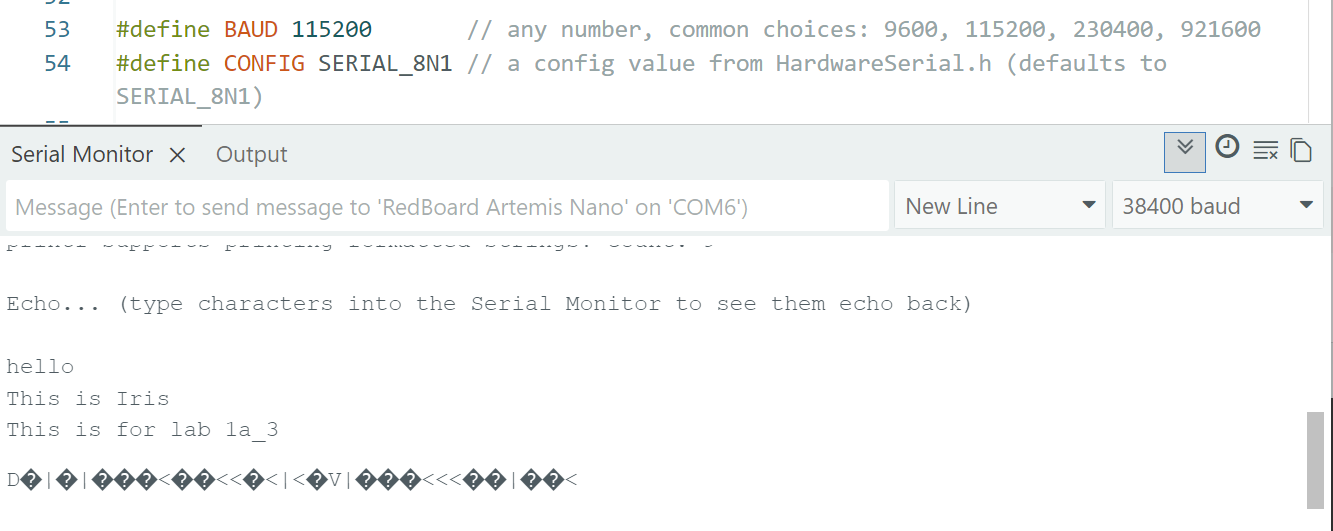
Serial communication requires consistent baud rate ebtween transmitter and receiver to ensure its accuracy. As picture below shown, it failed once I change baud rate to an inconsistent value of 38400 baud.
AnalogRead
Comparing the following two images: the first one is when I held the board and blew hot air to it; the second one is when leaving it back in the air. Temperature is higher in the first image.


MicrophoneOutput
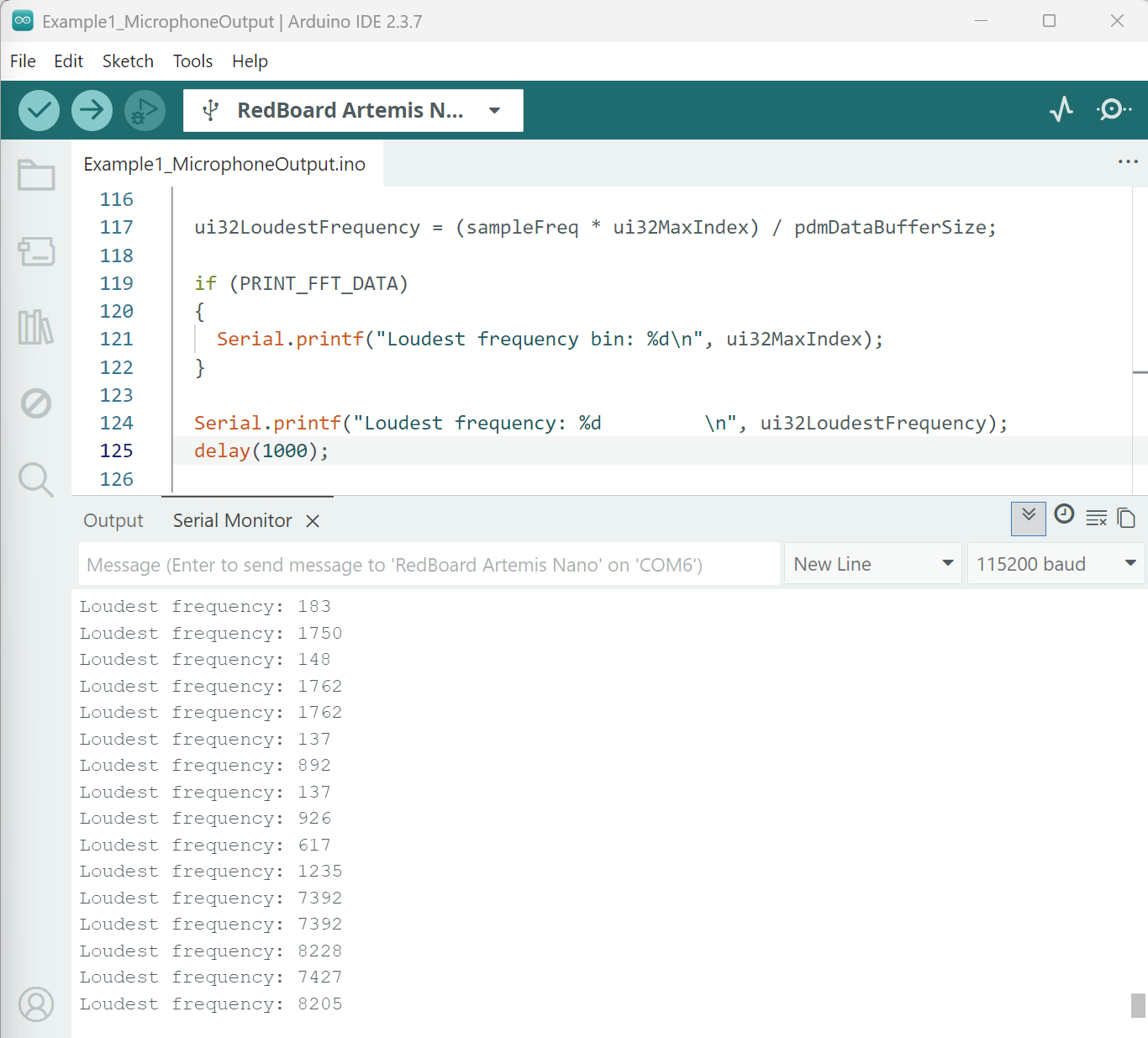
Holding the board close to table and knocking on the table, loudest frequency increases from maximum value of 1762 to 8228.
Lab 1b
In lab 1b, I implemented and tested a couple customed BLE commands to achieve data exchange using GATT characterisitics.
Prelab
I spent decent time debuging the error when updating Artemis MAC address. One error is that Arduino library folder actually saved both on Onedrive and locally on laptop in which case placment of "Sketchbook" in Onedrive potentially caused the conflicts.
Advertising BLE with MAC: c0:81:b1:24:23:64
Task 1
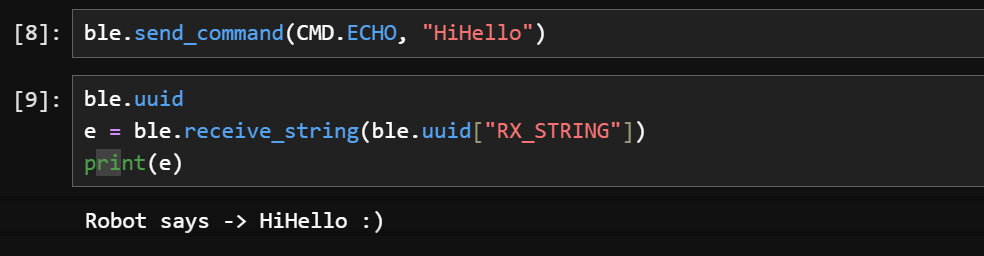
Echo is conducted in two steps: first, send one string over BLE to the characteristic on Artemis; second, have the laptop receive the response. BLE characteristics are basically the container of the data which can be identified by UUID. I used case PING to construct this response.
    ble.uuid
    e = ble.receive_string(ble.uuid["RX_STRING"])
    print(e)
    case ECHO:

            char char_arr[MAX_MSG_SIZE];

            success = robot_cmd.get_next_value(char_arr);
            if (!success)
                return;
            tx_estring_value.clear();
            tx_estring_value.append("Robot says -> ");
            tx_estring_value.append(char_arr);
            tx_estring_value.append(":)");
            tx_characteristic_string.writeValue(tx_estring_value.c_str());

            break;
Task 2
I referred to case SEND_TWO_INTS. However, the output in Arduino cut off some digits. Therefore, I secured three digits as necessary so that my floats can be accurate as bottom one shown.
        case SEND_THREE_FLOATS:
            /*
             * Your code goes here.
             */
            float flt_a, flt_b, flt_c;
            success = robot_cmd.get_next_value(flt_a);
            if(!success)
                return;


            success = robot_cmd.get_next_value(flt_b);
            if(!success)
                return;


            success = robot_cmd.get_next_value(flt_c);
            if(!success)
                return;


            Serial.print("Three floats: ");
            Serial.print(flt_a);
            Serial.print(", ");
            Serial.print(flt_b);
            Serial.print(", ");
            Serial.println(flt_c);

            break;
ble.send_command(CMD.SEND_THREE_FLOATS, "123.4:3.112:-0.956")
Advertising BLE with MAC: c0:81:b1:24:23:64
Connected to: a0:59:50:7b:9a:61
Three floats: 123.40, 3.11, -0.96
Advertising BLE with MAC: c0:81:b1:24:23:64
Connected to: a0:59:50:7b:9a:61
Three floats: 123.400, 3.112, -0.956
Task 3
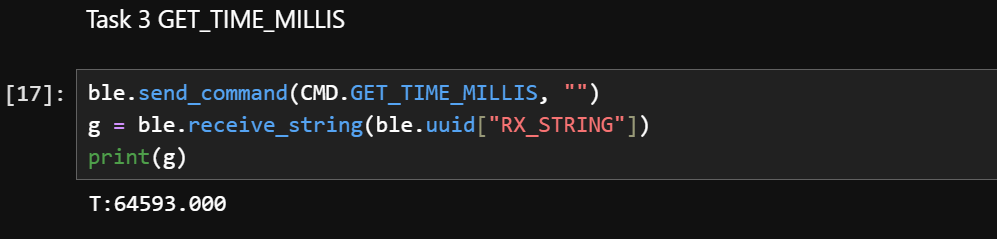
To access time and enable robot to reply time in a string, tx_estring_value and tx_characteristic_string.writevalue were used: the former is a carrier referring to the string, and the latter is the channel that sends the built string. Double(unsigned long) in C++ converts an unsigned integer value to a floating-point number, which enables more precise calculation.
class CMD(Enum):
    ...
    GET_TIME_MILLIS = 6
        case GET_TIME_MILLIS:

            tx_estring_value.clear();
            tx_estring_value.append("T:");
            tx_estring_value.append(millis());
            tx_characteristic_string.writeValue(tx_estring_value.c_str());

            Serial.print("Sent: ");
            Serial.println(tx_estring_value.c_str());

            break;
Task 4
The notification handler is very interesting: it is a callback, which means it won't work until BLE sends out data. Itself inside converts bytes to string to integer, while when it is called by start_notify it puts notification handler on hold waiting for data. The start_notify specifically check check if board (arduino) take the action as ordered from python. I now understand why send_command has to be behind start_notify: command cannot be sent before the notification is on, or handler won't react.
def notification_handler(send, byte_array):
    time_str = ble.bytearray_to_string(byte_array)
    time_int = int(time_str.split(":")[1])
    print (time_int)

ble.start_notify(ble.uuid["RX_STRING"], notification_handler)
ble.send_command(CMD.GET_TIME_MILLIS, "")
The callback function here automatically takes output from Task 3. I do not necessarily need to fill in "send" / "byte_array" as python fills the augments from BLE library.
Sent: T:64593.000
Sent: T:82556.000
Sent: T:115553.000
Sent: T:143196.000
Task 5
To estimate effective data transfer rate, I applied delay(20) to slow down the prcoess. I set the loop to collect until time reaches one second. I still received 85 messages as some of the delay may be not applied.
class CMD(Enum):
    ...
    LOOP_GETTIME = 7
    case LOOP_GETTIME:

            double t_i, t_o;
            t_i = millis();
            while (millis() - t_i < 1000)
            {
                tx_estring_value.clear();
                tx_estring_value.append("T:");
                t_o = millis();
                tx_estring_value.append(t_o);
                tx_characteristic_string.writeValue(tx_estring_value.c_str());


                delay(20);
            }
            break;
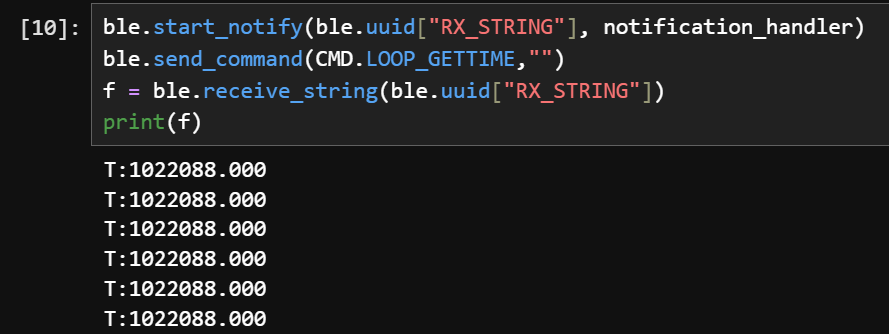
Since each message is 13 bytes, so by calculation the data transfer rate would be 85*13/1 = 1105 bytes/s = 8840 bits/s
Task 6
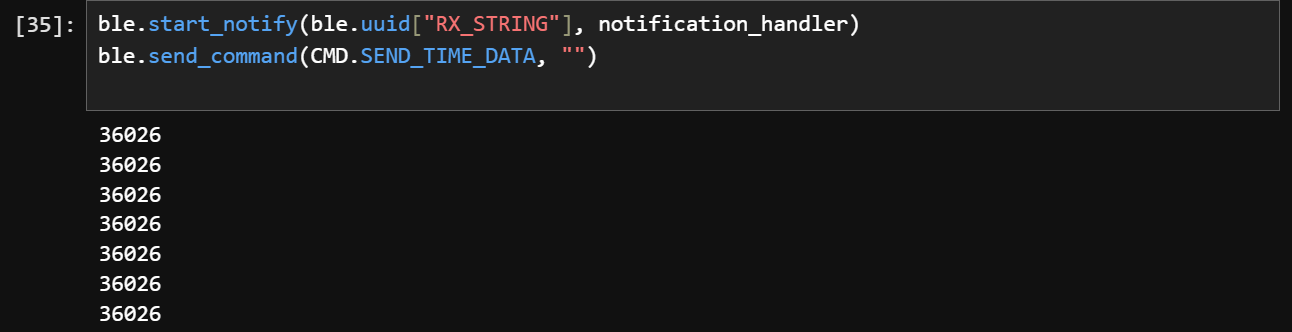
It asks the time stamps stored to an array and requires a command to loop the array and send data points as string. First, I built an array that collects data with a load of 200. A boolean is used to prevent filling in the array when it is full.
bool capacity_full = false;
void send_timestamp(unsigned long t){
    if (time_count < capacity_time) {
        time_box[time_count] =t;
        time_count++;
        // else it will stop collecting
    }
    if (time_count == capacity_time){
        capacity_full = true;
        Serial.println("Timestamp capacity full");
    }
}
Besides, I also wrote SEND_TIME_DATA to request a board to send collected timestamps. The board would go through each timestamp in time_box to send them as strings. In Python, I used a notification handler to prepare to receive and process timestamps.
        case SEND_TIME_DATA:
            Serial.println("Send time stamp array!");


            for (int i = 0; i < time_count; i++ ){
                tx_estring_value.clear();
                tx_estring_value.append("timestamp:");
                tx_estring_value.append((double)time_box[i]);
                tx_characteristic_string.writeValue(tx_estring_value.c_str());
                delay(20);

            }
            Serial.println("Finish sending array!");
            break;
Task 7
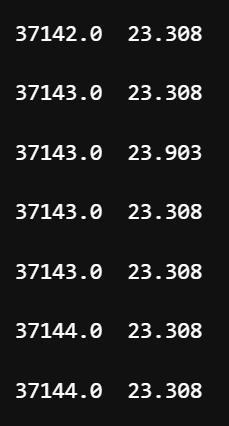
This time I want to record both time stamps and temperature on the board and prepare the function to send them together. On the python side, I modified my notification handler so it can extract the value of temperature from the string too.
I prepare the function record_two_array to collect the time and temperature data. The process of collecting is continuing under the condition of capacity being not full.
    void record_two_array(unsigned long t, float tem){
    if (count < capacity_time) {
        time_box[count] =t;
        temp_box[count] =tem;
        count++;
        // else it will stop collecting
    }
    if (count == capacity_time){
        capacity_full = true;
        Serial.println("Timestamp & Temperature capacity full");
    }
}
    def notification_handler(uuid, byte_array):
    #print (byte_array)
    time_str = ble.bytearray_to_string(byte_array)
    #print (time_str)
    parts = time_str.split(",")
    time_value = float(parts[0].split(":")[1])
    temp_value = float(parts[1].split(":")[1])
    time_list.append(time_value)
    temp_list.append(temp_value)
    for t, temp in zip(time_list, temp_list):
        print(f"{t}  {temp} \n")
Task 8
The first method enables the recording and the sending function right following each other; while the second only sends the data until they are all finished collecting. The advantage of the first method is that it has access to time close to the time stamp when it was actually collected. Therefore, it is pretty precise. However, the drawback is that the repeating process of changing between collecting and sending takes time.
In contrast, the second method sends all collected data together, which can be faster in processing time. Its disadvantage would be that there will be discrepancies between the recorded time and real time, as the delay associated with big quantities of data accumulates easily in this case. The frequency of data collection for the second method would be (37213-37134)/0.2s = 395 Hz. For every message it takes 15 bytes; 384 kB = 393216 bytes; Estimated available space for data would be 70%: 393216 * 0.7 = 275251 bytes. In estimation, that would be approximately 18350 samples.
Acknowledgement
Thanks to Michelle Yang and TA Jack Long for answering my questions about Task 4 streamlines of notification handler.
I referenced Trevor's and Jeffery's wesbite from last year about building command-handling and response construction and the formatting. I also used Generative AI ChatGPT for general debuging, error message analysis, and webpage writing.